
30 Days to a Revit Learning Path for Irish Architects, Trainer Backed


The fastest reliable Revit learning path is staged and project based: start with Autodesk’s free short courses, run a focused 30-day practice plan to reach working proficiency, then build toward certification through real project work. Autodesk’s official modules and a platform like S15studio cover the training itself. Expect focused practice over several weeks to reach working proficiency, and several months of applied project work for professional-level mastery.
TL;DR:
Reaching working proficiency typically requires about 40 to 60 hours, spanning roughly a month of consistent daily practice, focusing on small projects.
Advanced skills like worksharing and Dynamo automation demand several months of real project experience beyond initial learning.
Starting with Autodesk’s free introductory modules and then progressing to structured, project-based courses helps solidify skills and transition to professional-level tasks.
Certification should follow mastery of core topics, with the Certified User exam suitable after beginner and early intermediate stages.
Continuous project work, realistic collaboration exercises, and trainer feedback are essential for turning tutorial knowledge into practical, workplace-ready skills.
Table of Contents
What Is the Right Revit Learning Path From Beginner to Advanced?
A workable roadmap has three stages, and skipping ahead is the single biggest reason people stall out. Each stage builds a specific muscle, and each one has a natural stopping point where you can check your own work before moving on.
Beginner stage. The goal here is comfort with the interface, not mastery of every tool. You should be able to navigate the ribbon, set up levels and grids, place walls and doors, and generate a basic floor plan view and a simple sheet. Nothing fancy. Modeling a small single-story house and printing a basic sheet with a plan and an elevation is a solid beginner goal.
Intermediate stage. This is where Revit starts to feel like a real production tool. Focus shifts to documentation: schedules, tags, annotation standards, and templates. You’ll also start building simple families (a custom door, a piece of furniture) instead of relying only on the default library. This stage is less about new buttons and more about developing consistent habits that survive contact with a real project.
Advanced stage. Now you’re working across a team, not just alone. Worksharing, central and local files, family authoring at a deeper level, and Dynamo for repetitive automation all live here. This is also where BIM coordination, model linking, and clash awareness start to matter.
Here’s how to split your time between short official lessons and longer project-based courses:
Use short official modules for isolated skills you need fast (placing a wall type, setting up a schedule).
Use structured, project-based courses when you need to combine multiple skills into a real deliverable, since that’s what actually transfers to job performance.
Revisit official modules at the intermediate and advanced stages too. Autodesk keeps adding lessons that map onto real workflow gaps, not just beginner tasks.
How Long Does It Take to Learn Revit?
Working proficiency, meaning you can complete a small residential or commercial project unsupervised, typically takes a moderate amount of focused work spread over a consistent daily learning schedule. Full mastery, the kind that gets you trusted with worksharing setups and complex documentation, takes several months of repeated project work layered with the advanced topics.
Use these weekly checkpoints to test whether you’re actually progressing, not just watching tutorials:
Week 1: You can create levels, walls, doors, windows, and a basic roof, and produce one clean floor plan sheet.
Week 2: You can build a schedule, tag elements correctly, and set up a project template you’d reuse.
Week 3: You can create a simple custom family and place it correctly with parameters that update.
Week 4: You can package a small set of construction documents (plans, elevations, one section, one schedule) as if handing it to a reviewer.
If you’re hitting these deliverables on schedule, you’re on pace for working proficiency inside a month.
Which Revit Courses and Certifications Should You Actually Prioritize?
Start with Autodesk’s own material before spending any money. Learn Revit in 90 minutes is a single hands-on course that walks you through modeling a simple house, complete with practice files in both metric and imperial units and a built-in challenge to test what you learned. It’s a genuinely efficient way to get oriented in under two hours.
Once you’ve got your bearings, Autodesk’s Review the Basics learning path breaks core tasks into seven lessons of about 20 minutes each, covering everything from navigation and layout to curtain walls, CAD linking, and visualization. These bite-sized Autodesk learning pathways pair lessons with practice files and challenges specifically so the skills stick rather than evaporate after the video ends.
Free modules get you through the beginner stage. Once you hit intermediate territory, a structured, project-based course earns its cost because it forces you to combine skills into something resembling real deliverables, rather than isolated exercises.
On certification: the sequence matters.
Prepare for the Autodesk Certified User (ACU) exam once you’ve completed the beginner and early intermediate stages. It tests foundational competency, not advanced workflow fluency.
Aim for Autodesk Certified Professional status only after you’ve handled worksharing, family authoring, and at least one full project cycle. Attempting it earlier usually means studying material you haven’t actually used yet.
How Do You Turn Short Courses Into Real Skill With One Practice Project?
Running every new skill through a single ongoing practice project, rather than starting fresh with each tutorial, is what actually locks in retention. You’re not just learning isolated commands; you’re watching how each new tool interacts with decisions you already made three weeks earlier. Start with a small house model and keep layering complexity onto it: linked files, then schedules, then families, then a worksharing setup.
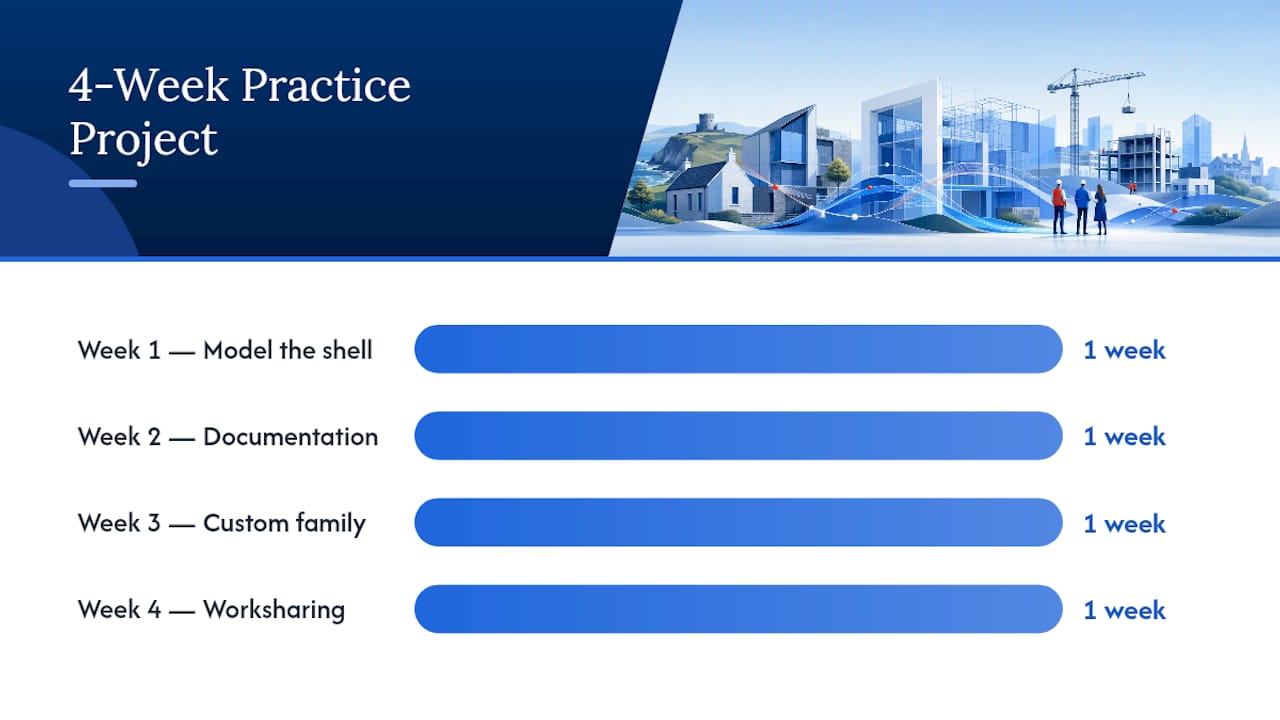
Here’s a sample 4-week schedule built around that idea:
Week 1: Model the shell (walls, floors, roof, basic openings) and produce a first floor plan sheet.
Week 2: Add documentation. Build schedules, apply consistent tags, and set up a real project template.
Week 3: Introduce a custom family (a stair detail, a furniture piece, a door type) and place it with working parameters.
Week 4: Split the model into worksets and simulate collaboration by creating a second local file, as if a colleague were editing alongside you.
By the end, you have a small but complete deliverable set: a shell model, a documented sheet package, a custom family, and a worksharing exercise. That’s portfolio material, not just practice files.
Pro Tip: If you don’t have a real collaborator to test worksharing with, open a second session of Revit yourself using a different user login and simulate two people editing the same central file. It exposes syncing and ownership issues faster than reading about them ever will.
Which Advanced Revit Skills Are Worth Specializing In First?
Once intermediate work feels routine, prioritize in this order: family creation, worksharing, then Dynamo. Family authoring teaches you Revit’s parametric logic at its most fundamental level, and that understanding makes everything after it easier. Worksharing comes next because most real offices run on shared central files, and the failure modes (element ownership conflicts, worksets left improperly divided) are easier to learn in practice than in a crisis.
Dynamo, Revit’s visual scripting environment, is where automation lives. Save it for last since it assumes fluency with the modeling logic it’s automating. Alongside all three, get comfortable checking IFC exports for interoperability with other disciplines, and keep an eye on the Revit architecture roadmap so upcoming feature changes don’t blind side your workflow.
Trainer-Backed Guidance Behind This Roadmap
This roadmap reflects how Steve Fagan, an Autodesk Certified Trainer and founder of S15studio, structures instruction: project based, sequenced by real workflow demands, with trainer feedback closing the gap between watching a tutorial and actually producing usable work.
What Hardware and Software Do You Need to Run Revit Well?
Revit is demanding on hardware in ways that surprise a lot of beginners who assume any modern laptop will do. You need a 64-bit Windows machine (Revit doesn’t run natively on macOS), a multi-core processor, and at minimum 16GB of RAM, though 32GB is a far more comfortable baseline once you’re working with linked files and larger models. A dedicated graphics card with proper driver support matters more than most people expect, since Revit’s 3D view performance degrades fast on integrated graphics.
Storage should be solid-state, both for load times and for Revit’s habit of writing frequent backup files. A dual-monitor setup isn’t required, but once you’re managing schedules, sheets, and a 3D view simultaneously, it becomes hard to go back to a single screen.
On the software side, you’ll need an active Revit subscription, which Autodesk’s product overview describes as a platform for designing, documenting, and delivering architecture and engineering projects end to end. Beyond Revit itself, plan on having a PDF viewer for markup review, and if you’re planning to reach the advanced stage, a base familiarity with Dynamo’s visual scripting interface, which ships with Revit and doesn’t require separate installation.
What Career Paths Depend on Strong Revit Skills?
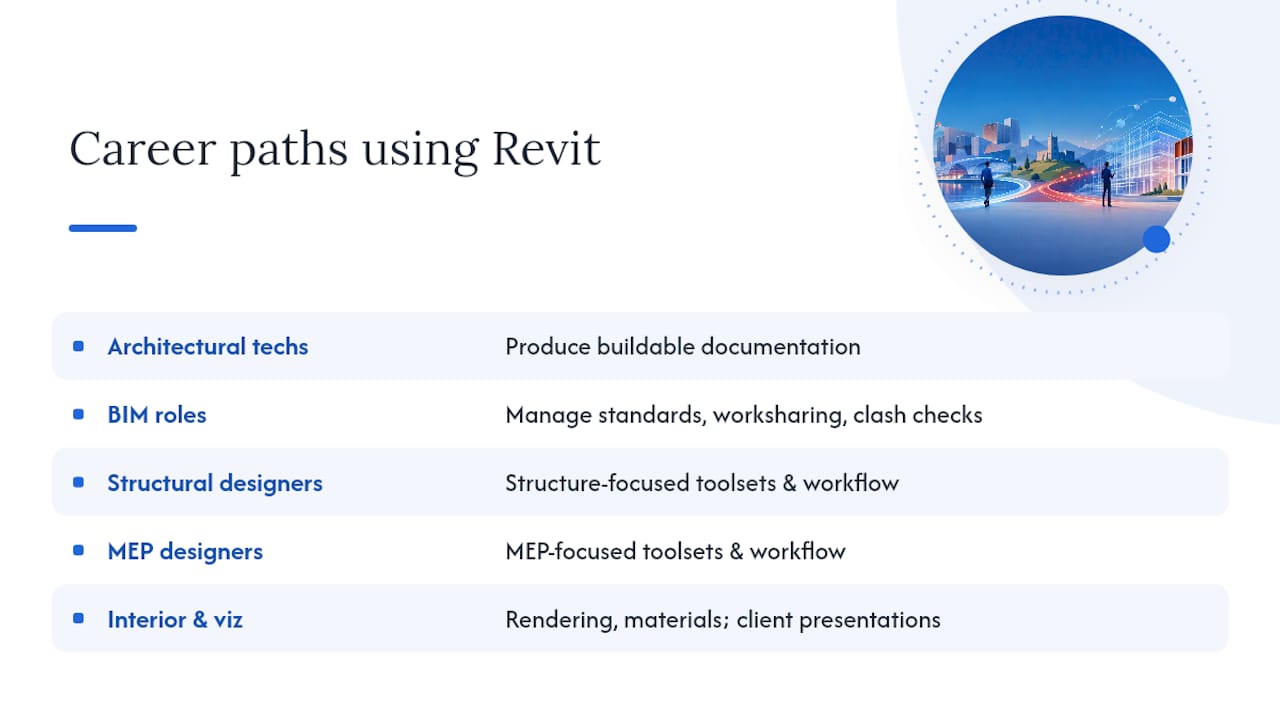
Revit proficiency opens doors well beyond the traditional “architect” label, and the range of roles surprises people who assume it’s a niche design-software skill. Architectural technicians and drafters use Revit daily to turn design intent into buildable documentation, often specializing in a particular building type or delivery phase.
BIM coordinators and BIM managers sit a level up: they’re less focused on modeling individual elements and more on managing model standards, worksharing structure, and clash coordination across disciplines. That role increasingly requires the advanced skills covered earlier, particularly worksharing and interoperability checks.
Structural and MEP designers use Revit’s discipline-specific toolsets, which share the same core interface but diverge sharply in workflow once you’re past the basics. Interior designers and visualization specialists lean heavily on Revit’s rendering and material tools, often pairing it with dedicated rendering software for client presentations.
For architecture graduates specifically, Revit proficiency is frequently a baseline hiring requirement rather than a differentiator. Firms increasingly expect candidates to arrive with working knowledge of documentation standards and template use, which is exactly why the intermediate stage of any roadmap deserves real attention rather than being treated as a quick stop on the way to advanced topics.
How Do You Fit Revit Into Real BIM Team Workflows?
Revit skill only pays off once it connects to how a real project team actually works, and that means thinking past your own model early. Worksharing habits you build solo need to translate to a shared central file with structural, MEP, and other consultants all pulling from linked models simultaneously. Get comfortable checking for worksets that are too broad or too narrow, since both create friction once more than one person is editing.
Interoperability is the other half of the equation. Exporting clean IFC files matters when your model needs to talk to consultants using different software, and small habits (consistent naming, proper category assignments) prevent painful cleanup later. If your practice project included a sustainability component, something like solar integration for architects is a good example of the kind of real-world design constraint worth building into a portfolio project, since multidisciplinary coordination is exactly what employers want to see evidence of.
Finally, build a habit of checking Revit’s linked model status and worksets before every work session, not after something breaks. It’s a small discipline that separates people who’ve merely learned Revit from people who can actually work inside a live BIM team.
Why Trainer Feedback Beats Self-Study Alone
Most advice on learning Revit treats it like learning software: watch enough tutorials, and competence follows. That’s backwards. Revit’s real difficulty isn’t the interface, it’s judgment: knowing when to model something as a family versus an in-place component, or when a workset boundary will cause headaches six weeks later. Tutorials can’t teach judgment. Feedback on your own decisions can.
That’s the gap conventional roadmaps miss. They front-load feature lists and back-load “now build a project,” as if the sequence doesn’t matter. It does. A single ongoing practice project, reviewed periodically by someone who’s made the same mistakes professionally, compresses months of trial and error into weeks. This is precisely the mechanism behind S15studio’s approach, and it’s not a marketing flourish. It’s the difference between knowing Revit’s commands and knowing how to use them the way a working office expects.
If you take one thing from this roadmap, let it be this: don’t chase more tutorials once you’ve covered the beginner stage. Chase feedback on the one project you’re already building.
— Steve
How S15studio Can Take You From Roadmap to Certification
An effective approach includes one practice project, trainer feedback, and course structure matched to where you actually are, not a generic beginner-to-expert dump. For someone just starting out, the Revit Introduction course (20 EUR) gets you moving fast. Once you’re past the basics, the Intermediate Course (from 100 EUR) and Advanced Course (from 79 EUR) map directly onto the stages covered here, and the dedicated Worksharing Course (15 EUR) tackles the team-collaboration skills that trip up most self-taught learners.
Courses typically include project-based practice, direct trainer feedback, lifetime access to materials, and a completion certificate, so you’re not paying once and figuring the rest out alone. If you’re aiming at certification, the full Revit Course Only package (79 EUR) covers beginner through advanced content in one purchase and sets you up for ACU exam prep. Start with the Revit Introduction lesson this week and see how the project-based format compares to a video playlist you’d otherwise stall out on.
Selected Resources Worth Bookmarking
For ongoing reference, keep Autodesk’s Learn Revit in 90 minutes course and the Revit architecture roadmap bookmarked for feature updates. For structured practice, S15studio’s Revit practice projects and Dynamo automation guide cover the applied side once you’re past the fundamentals.
Sources
FAQ
What Is the Best Way to Learn Revit?
The most reliable method combines Autodesk’s free official modules for foundational skills with a single ongoing practice project that grows in complexity over time. Structured, project-based courses fill the gap once you need to combine multiple skills into a real deliverable, which self-paced tutorials alone rarely achieve.
Can Revit Be Self-Taught?
Yes, the beginner and much of the intermediate stage can be self-taught using resources like Autodesk’s Review the Basics learning path. Advanced skills like worksharing and Dynamo automation tend to go faster with structured feedback, since judgment calls are hard to self-correct without outside review.
Can I Learn Revit in 7 Days?
You can learn the basic interface and simple modeling in a week with focused daily practice, but working proficiency realistically takes closer to 30 days of consistent effort. Seven days is enough to get oriented, not enough to produce a documented project independently.
How Long Will It Take to Learn Revit?
Expect roughly 40 to 60 hours, or about 30 days at 1 to 2 hours daily, to reach working proficiency on a small project. Professional-level mastery, including worksharing and advanced family authoring, typically takes several months of applied project work beyond that point.
How Much Does Revit Training Cost?
Pricing depends on scope. S15studio’s Revit Introduction course starts at 20 EUR, while the full Revit Course Only package covering beginner through advanced material is 79 EUR one time.
Recommended
Comments