
Common CAD Coordination Challenges and How to Fix Them
- Steve Fagan

- 11 minutes ago
- 17 min read

Most CAD and BIM coordination problems trace back to a short, predictable list, and each one has a fix that doesn’t require new software. Here’s the answer, then we’ll unpack why it happens and what to do about it:
Version control chaos — enforce check-in/check-out through worksharing or a proper CDE, not shared drives.
Interoperability gaps (IFC/DWG/RVT losses) — standardize export profiles per discipline before every exchange.
LOD mismatch — lock an element-level LOD matrix by phase in the BEP.
Role ambiguity — assign a named federated-model owner with sign-off authority.
Clash backlog — triage by discipline pair and severity within 48 hours of each run.
Large-data performance drag — publish decimated review models for remote viewers.
Training gaps — run role-based worksharing and clash-triage modules before kickoff.
Late design changes — freeze shared coordinates and gate changes through a formal RFI.
Xref/link breakage — centralize paths and audit links before every federation.
Naming drift — enforce a shared naming convention at project start, not mid-project.
Key Takeaways
Most CAD and BIM coordination failures stem from governance gaps, not software limitations, and they resolve fastest with clear ownership, enforced conventions, and role-based training.
Point | Details |
Coordination is socio-technical | Isolated working and unclear ownership cause more clashes than any single tool limitation. |
Version control needs an owner | Enforce check-in/check-out and one authoritative file location instead of shared-drive habits. |
LOD mismatch inflates clash counts | Lock an element-level LOD matrix by phase to cut false-positive clashes. |
Architecture and electrical seams need priority review | Cross-discipline conflicts, especially this pair, account for the majority of confirmed issues. |
Training closes persistent gaps | Role-based courses, like S15studio’s Revit worksharing training, build the shared conventions that prevent repeat coordination errors. |
Table of Contents
What Common CAD Coordination Challenges Actually Look Like
Coordination breaks down because it’s a socio-technical problem, not a technical one. Teams assume that better software fixes broken workflows, but the research says otherwise: isolated working, unclear ownership, and weak governance around the common data environment (CDE) are bigger drivers of clashes than the modeling tools themselves.
Version histories in cloud CAD platforms illustrate this well. Automated versioning can flood a project timeline with dozens of untitled saves a day, which buries the handful of changes that actually matter. No tool setting fixes that. Only a team habit, like requiring a one-line description on every meaningful save, does.
The deeper pattern shows up in how teams actually work. A study of MEP clash root causes found isolated working to be a primary driver, and that CDE work-in-progress structures often reinforce silos instead of breaking them down.
Root causes worth naming directly:
Disciplines modeling in isolation with no shared check-in cadence.
No enforced BIM Execution Plan (BEP), so LOD and naming rules exist on paper only.
Mixed toolsets across consultants with no agreed exchange format.
No single owner for the federated model, so unresolved clashes drift to whoever notices last.
Bandwidth and performance pressure that pushes people back to local, unsynced copies.
Pro Tip: Assign one named person as federated-model owner and require a three-step QA pass (geometry check, LOD check, naming check) before any discipline model enters the federation. That single gate removes a large share of avoidable clash noise before it ever reaches a coordination meeting.
Why Do Version Control and File Management Break Down?
The main failure modes are predictable: last-save-wins overwrites, naming drift across revisions, broken parametric links after a host file moves, and lost audit trails when files pass between consultants. Each one compounds the next, because a broken link often isn’t noticed until fabrication.
Cloud CAD and PDM tools solve some of this, but hybrid environments where some team members work locally and others work in the cloud create their own sync gaps. Parametric dependencies, large binary file sizes, and network latency all push toward accidental overwrites and broken assemblies when file-locking isn’t CAD-aware.
Fixes that hold up on real projects:
Designate one authoritative source location for every model, never a personal drive or laptop copy.
Enforce check-in/check-out through native worksharing or a PDM system rather than manual file renaming.
Automate lightweight exports (IFC or PDF) for vendors so they never touch the live authoring file.
Log every federation event with a timestamp and a named submitter.
Broken parametric links hit assemblies hardest. A wall type reference that silently disconnects can cascade through dozens of downstream families, and nobody notices until a fabricator flags a clash that shouldn’t exist.
Pro Tip: Run a three-minute pre-federation check before every upload: confirm shared coordinates, confirm the file opens without warnings, and confirm the last save has a real description. It sounds trivial. It eliminates a surprising share of Monday-morning “why is this wrong” meetings.
How Do Interoperability Gaps Between CAD Software Cause Coordination Problems?
Two patterns explain almost every interoperability failure: mixed-authoring ecosystems where each consultant uses a different platform, and export/import losses where geometry or data simply doesn’t survive the round trip. Collaborative design and data management issues, including scattered file management and permissioning gaps, remain among the most pervasive problems professional CAD teams report.
Cloud-native platforms, desktop file-based workflows, and neutral formats like IFC each solve a different piece of this, and none of them solves all of it:
Workflow type | Best for | Main risk |
Cloud-native (e.g., Autodesk Construction Cloud) | Real-time multi-user access, live worksharing | Requires consistent connectivity and licensing across all parties |
Desktop file-based (local RVT/DWG) | Single-discipline authoring, tight file control | Version drift once files leave the local network |
Neutral format (IFC) | Cross-platform exchange between different authoring tools | Data loss or misinterpretation if export mapping isn’t configured |
Common pitfalls include opening a newer Revit file in an older version, DWG version mismatches between AutoCAD releases, and IFC exports that drop parameters a downstream tool expects. Mitigating this means agreeing on export profiles and file-naming conventions before the project starts, not after the first failed handoff.
Tools like Revit, Navisworks, ArchiCAD, Solibri, and Onshape each handle these exchanges differently, and none of them replace an agreed exchange protocol. The autodesk.com ecosystem and Graphisoft’s ArchiCAD both support IFC, but their default mappings aren’t identical, which is exactly why blind trust in “IFC compliant” labeling causes surprises.
Does Inconsistent LOD Cause False Clash Detection Results?
Yes, and this is one of the most underrated sources of coordination waste. A large share of reported clashes aren’t real conflicts. They’re LOD artifacts, where one discipline modeled a duct at LOD 300 detail and another left a placeholder at LOD 100.
The fix is an element-level LOD matrix that locks expectations by phase, enforced through the BEP and referencing BIMForum LOD guidance. Structural steel might need LOD 350 by design development while landscaping stays at LOD 200 until construction documents.
Modeling conventions to standardize alongside LOD:
Consistent naming across families and worksets.
Shared parameters used the same way by every discipline.
A single agreed host origin point for every model.
Family sizes and file complexity capped to protect performance.
Pro Tip: Build a short automated rule-check list (naming, origin point, LOD tag) that every model must pass before it enters the federated model. It takes minutes to run and catches the errors that otherwise surface as “false” clashes three meetings later.
Who Owns Coordination Decisions When Roles Are Unclear?
Unclear decision rights multiply coordination cycles faster than any technical issue. When nobody is explicitly accountable for resolving a clash, it doesn’t disappear. It gets deferred, often all the way to the construction site, where fixing it costs far more than fixing it on screen.
Diffusion of responsibility is the real name for this. Everyone assumes someone else will close the loop. A simple RACI structure removes the ambiguity:
Federation owner — Responsible for merging discipline models and flagging conflicts (typically the BIM lead).
Discipline leads — Accountable for resolving clashes within their own model.
Design manager — Consulted on any change affecting scope or budget.
All team members — Informed of federation schedule and resolution deadlines.
Actionable items worth locking in at project start: name who owns the federation, who has authority to approve LOD changes mid-project, and who has final sign-off closing an RFI. Without those three answers written down, every unresolved clash becomes a debate about whose job it was.
How Should Teams Structure a Clash Detection Workflow?
Clash detection confirms coordination quality. It isn’t a substitute for a coordination plan, and treating it as one is why so many projects end up with a spreadsheet of 400 unresolved clashes nobody trusts.
A working issue-resolution process looks like this:
Pre-filter automated results to remove tolerance-level and LOD-artifact clashes.
Triage remaining conflicts by discipline pair and severity.
Assign each clash a named owner with a resolution deadline.
Verify the fix in the next federation pass before closing it.
An empirical audit of 4,968 drawing sheets found roughly 7 adjudicated conflicts per 100 sheets, with architectural and electrical the single most conflict-prone discipline pair, and 77% of conflicts occurring across disciplines rather than within one. That’s a strong argument for weighting triage effort toward architecture-to-MEP seams first.
Tool-agnostic practices that hold regardless of platform: filter by discipline pair before reviewing anything visually, separate hard clashes from clearance issues, and set a weekly cadence for clash meetings rather than reviewing on demand. Ethnographic research on BIM coordination meetings found that poor navigation of the model live in meetings is itself a major bottleneck, so a designated model driver with a rehearsed walkthrough beats improvising on the fly.
Why Do Large Models and Point Clouds Slow Down Coordination?
Performance bottlenecks push teams toward local copies of huge files, and local copies drift out of sync with the authoritative model within days. That’s the core trade-off behind most large-data coordination problems.
Practical workarounds that don’t require new infrastructure:
Decimate point clouds before distributing them for general review.
Publish a lightweight federated view for stakeholders who only need to look, not edit.
Use cloud viewers for remote reviewers instead of shipping full native files.
Slice large point-cloud deliveries by zone or level rather than distributing the whole scan.
Industry guidance on distributed CAD teams points to cloud viewers and filtered federations as the most reliable fix for remote performance constraints, particularly when reviewers are on inconsistent network connections.
Pro Tip: Maintain one standard “cut-down” review model, refreshed weekly, that strips heavy point-cloud and rendering data. It cuts open times dramatically and keeps everyone pointed at the same authoritative source instead of quietly working from stale local copies.
Where Should Teams Invest in CAD and BIM Training First?
Many coordination failures trace back to uneven skills, not bad intentions. A team member unfamiliar with worksharing conventions or model-exchange etiquette can undo a week of clean coordination in a single careless save.
Priority training topics, roughly in order of coordination impact:
Worksharing mechanics and check-in/check-out discipline.
Version control habits and what counts as a “meaningful” save.
BEP and LOD literacy, so modelers know what’s expected at each phase.
Clash triage skills, including how to distinguish real conflicts from artifacts.
CDE usage conventions specific to the project’s chosen platform.
The most effective format is role-based: short, hands-on modules tied to the exact task someone performs, rather than a generic overview session. Measurable outcomes look like fewer repeat clashes and cleaner reports, not just attendance numbers. Structured courses and trainer-led workshops on Revit worksharing are one of the highest-leverage ways to close these gaps, since most coordination failures stem from no single party owning the shared modeling space.
Pro Tip: Run the worksharing and clash-triage modules before kickoff, not after the first coordination disaster. Retraining mid-project costs far more in rework than training up front.
What Should a Project Team Fix First?
Sequence matters more than most teams assume. Fixing the wrong thing first wastes goodwill and budget on a problem that a governance change would have solved for free.
Priority order that holds up across most projects:
Immediate (week 0): Lock shared coordinates across all discipline models.
Immediate (week 0): Enforce the BEP’s LOD matrix in writing, not just verbally.
Next 30 to 60 days: Establish pre-federation QA with a named owner.
Next 30 to 60 days: Set version-control rules and a single authoritative file location.
Ongoing: Schedule a weekly clash triage meeting with assigned owners and deadlines.
Timeframe | Action | Priority |
Week 0 | Lock shared coordinates, confirm BEP LOD matrix | High |
Week 1 to 4 | Set up pre-federation QA gate and version-control rules | High |
Month 2 to — | Run role-based training and refine clash-triage cadence | Medium |
The BIM lead should own coordinates and the federation gate. Discipline leads should own their own model’s LOD compliance. Design management should own the weekly triage schedule. None of this requires new software, just clear ownership of steps that already exist on paper.
Coordination Failures Between Trades and Communication Gaps
Trade coordination fails most often at the seams between disciplines, not within a single discipline’s own model. Structural steel conflicts with ductwork. Plumbing routes conflict with electrical conduit. These cross-discipline clashes account for the overwhelming majority of confirmed conflicts, at 77% by one audit, which tells you where communication actually needs to happen.
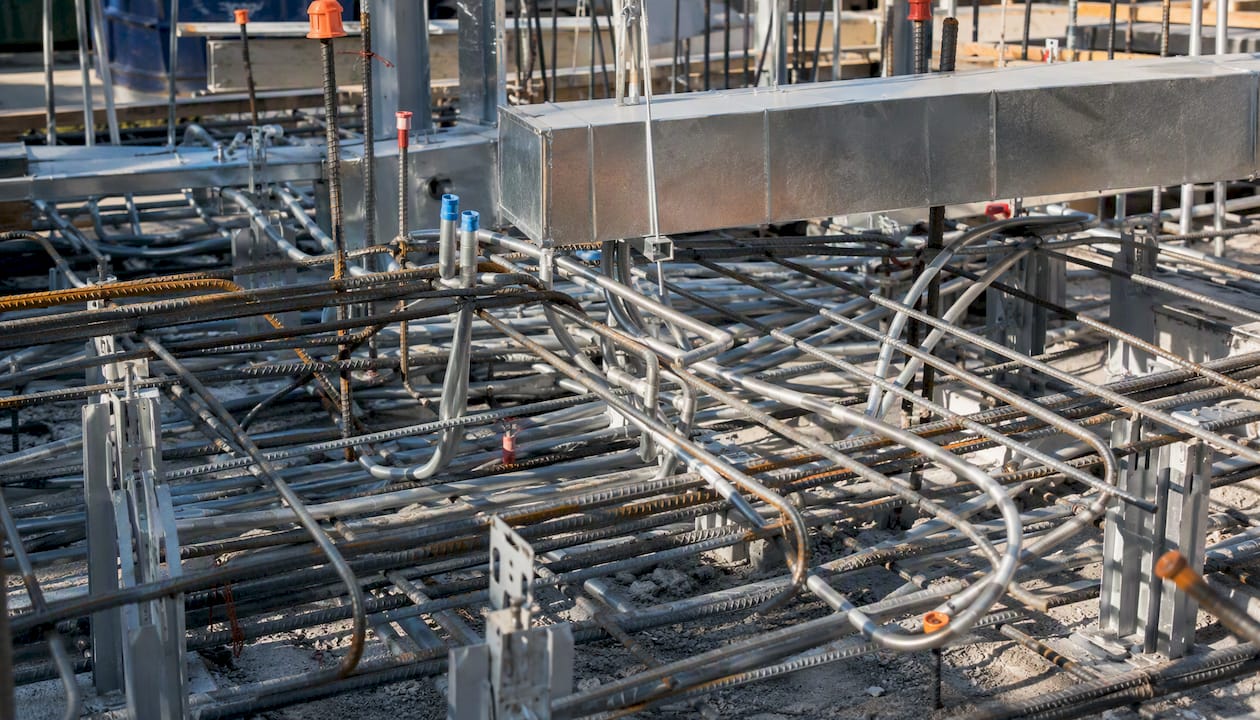
The communication gap usually isn’t a lack of meetings. It’s a lack of shared visibility between meetings. A structural engineer might update a beam depth on Tuesday and not mention it until the Thursday coordination call, by which point the mechanical team has already routed ductwork through the new obstruction. That three-day gap is where most rework originates.
Weak issue documentation compounds this. Ethnographic research on coordination bottlenecks found that insufficient knowledge capture, meaning issues get discussed verbally but never logged with enough context, forces teams to re-litigate the same clash in multiple meetings because nobody remembers the agreed resolution.
Fixing this doesn’t require new software. It requires a rule that any dimensional change affecting another discipline gets flagged the same day, in writing, in the shared coordination log, not held for the next scheduled meeting. Pair that with a designated point of contact per discipline who’s actually empowered to answer questions in real time, rather than routing every query through a project manager who has to ask someone else. Speed of communication matters more than the volume of meetings.
How Do Late Design Changes Disrupt Construction Sequencing?
Poor sequence planning and late design changes feed each other in a loop that’s hard to break once it starts. A late structural revision forces a sequencing change, which forces a schedule change, which pressures the next trade to start before their inputs are actually finalized.
The construction sequence should be locked before detailed coordination begins, not treated as an afterthought once models are federated. When sequencing gets treated as a downstream scheduling exercise rather than a coordination input, teams end up designing systems in an order that doesn’t match how they’ll actually get built. Ductwork gets modeled assuming open ceiling access that a structural change later eliminates.
Late design changes are sometimes unavoidable, a client requirement shifts, a code issue surfaces late, but the damage they cause is almost entirely about how the change gets communicated, not the change itself. A structural depth change that gets flagged to every affected discipline within 24 hours costs a redesign cycle. The same change discovered three weeks later during fabrication costs a schedule delay and a change order.
Practical guardrails that reduce this damage:
Freeze major structural and MEP routing decisions before the sequencing plan is finalized.
Require any change affecting shared coordinates or major systems to route through a formal RFI, not a hallway conversation.
Model construction sequence logic (4D scheduling) early enough to catch sequencing conflicts before they reach the field.
None of this eliminates late changes. It shrinks the window where a late change turns into a costly one.
What Does Poor Coordination Actually Cost a Project?
Every coordination failure eventually shows up as either a cost overrun or a schedule slip, usually both, because the two are rarely independent on a construction project. A clash discovered on-screen costs a model update. The same clash discovered on-site costs a change order, a delay while the fix gets designed, and often a dispute over who pays for it.
The discipline-pair data makes the financial argument concrete. If architectural and electrical clashes are the single most conflict-prone interface, and cross-discipline conflicts make up 77% of all confirmed issues, then under-resourcing review at exactly those seams is where budgets quietly bleed. Teams that spread review effort evenly across all discipline pairs are effectively under-reviewing the interfaces most likely to cause expensive field problems.
The upstream framing matters here too. Clash detection reports are often treated as the coordination plan itself, when in reality the process failures that create those clashes happen well before detection runs. By the time a project is looking at hundreds of reported conflicts, the cost of resolution has already multiplied, because early design decisions locked in assumptions that later got violated.
Schedule impact compounds because construction sequencing rarely has slack built in for rework. A delay in one trade’s installation cascades to every trade scheduled after it. That’s why the cheapest coordination fix is always the one applied before federation, not after.
How Can Teams Get Stakeholders Collaborating Earlier?
Early collaboration works because it moves conflict resolution to the point where it’s cheapest: on-screen, before anyone has ordered materials or scheduled a crew. Waiting until design development to bring in MEP consultants means structural decisions are already locked, leaving mechanical routing to fight for whatever space is left over.
A few strategies consistently move the needle:
Bring key trade consultants into the model review process during schematic design, not after.
Use a shared BEP, agreed and signed by every discipline lead, before any modeling starts.
Hold a kickoff coordination session focused specifically on shared coordinates, naming conventions, and LOD expectations, separate from the general project kickoff.
Set a recurring, non-negotiable coordination meeting cadence from day one, rather than scheduling one reactively once problems surface.
The CDE structure itself plays a role here that teams underestimate. Research on MEP clash causes found that work-in-progress sections of a CDE can create digital silos that discourage the kind of concurrent, visible collaboration early engagement is supposed to enable. An open work-in-progress approach, where disciplines can see each other’s in-progress models rather than only finished, published versions, tends to surface conflicts earlier than a strict publish-on-schedule structure.
Getting buy-in for this requires leadership to treat early coordination time as protected project time, not a nice-to-have that gets cut when the schedule tightens.
What Are the Real Limits of Common Data Exchange Formats?
IFC, DWG, and RVT each solve exchange for a specific slice of the workflow, and each one has known failure points that catch teams off guard. IFC is the closest thing to a universal neutral format, but different authoring tools map their own parameters to IFC schema differently, so an export that looks complete can silently drop information a downstream tool expects to find.
DWG carries its own version-compatibility baggage. Opening a DWG saved in a newer AutoCAD release inside an older version can strip entities or flatten data the newer format supported. RVT has the added complexity of parametric families that don’t translate cleanly to any neutral format at all, since the relationships between elements, not just their geometry, are part of what makes the model useful.
Solutions that actually work in practice rather than in theory:
Agree on export profiles per discipline before the first exchange, specifying exactly which parameters must survive the round trip.
Test one full export/import cycle early in the project to catch mapping issues before they multiply across hundreds of files.
Keep a native, authoritative version of every model even when neutral formats are used for exchange, so nothing valuable only exists in a lossy export.
No format eliminates exchange loss entirely. The goal is catching it early, when a missing parameter is an afternoon’s fix, rather than late, when it’s a fabrication error.
How Does Leadership Influence Coordination Success?
Coordination succeeds or fails based on whether leadership treats it as a genuine priority with protected time and clear authority, or as an administrative afterthought squeezed between other deadlines. Teams with a clearly designated coordination lead, someone with actual authority to make binding decisions in a meeting, resolve conflicts faster than teams where every decision gets escalated and delayed.
Communication protocols matter as much as the org chart. A written escalation path, who gets contacted when a clash can’t be resolved at the working level, prevents the drift where unresolved issues quietly get deferred because nobody wants to be the one pushing back on another discipline’s design.
This connects directly to the socio-technical framing that runs through every coordination failure covered here: governance and shared decision rights determine whether a CDE and a clash-detection tool actually reduce conflicts, or just generate reports nobody acts on. Leadership sets the tone for whether coordination meetings are treated as a compliance exercise or a working session with real teeth.
The practical marker of strong leadership here is simple: does the project have a named person whose job is explicitly to close coordination loops, and does that person have the authority to make a discipline redo work when necessary? Where that role exists and is respected, backlogs stay manageable. Where it doesn’t, backlogs grow until someone senior gets pulled in during a crisis.
What Do Real Coordination Failures Look Like When They’re Fixed?
The architecture-to-electrical seam is the most instructive example, since it’s the single most conflict-prone discipline pair in the audited dataset. A typical case: an architectural ceiling plan shows a reflected pattern that conflicts with electrical fixture locations, but because the two disciplines review on separate cycles, the conflict isn’t caught until a general coordination meeting weeks later. The fix isn’t new software. It’s a rule requiring architectural and electrical models to run a dedicated cross-check before every general federation, since the data shows this pair alone accounts for a disproportionate share of confirmed conflicts.
Another recurring pattern involves LOD mismatch masquerading as a real clash. A structural model built to LOD 350 gets federated against a mechanical model still at LOD 200 placeholder level, generating dozens of “clashes” that are really just detail-level mismatches. Teams that catch this early, by checking LOD compliance before running clash detection, avoid wasting a coordination meeting arguing over conflicts that don’t actually exist. Teams that don’t catch it burn hours triaging noise.
A third pattern shows up around version drift. When a discipline works from a local copy during a network outage and reintroduces it days later, it can silently overwrite newer coordinated work. The fix that holds up: a hard rule that no local copy re-enters the federation without a manual comparison against the current authoritative version first.
What Do Trainers See as the Most Avoidable Coordination Mistakes?
The mistake I see most often isn’t a tooling failure. It’s teams skipping the boring governance step, the pre-federation QA check, the named model owner, the written LOD matrix, because it feels like overhead when deadlines are tight. Every time I’ve walked a team through fixing a persistent clash backlog, the root cause traces back to one of those missing basics, not a software limitation.
One recurring fix that sticks: training a discipline lead to run a five-minute worksharing and naming audit before every submission cuts repeat clashes dramatically within a few coordination cycles. It’s not glamorous work. It’s the difference between a coordination meeting that resolves real conflicts and one that re-litigates avoidable ones.
How Targeted Training Removes Coordination Bottlenecks
Training cuts repeat coordination errors by teaching the shared conventions, worksharing discipline, and pre-federation QA habits that no software update can enforce on its own. S15studio is built for exactly this gap: project-based Revit and AutoCAD courses that teach the coordination skills this article covers, not just software mechanics in isolation.
Three course paths map directly to what’s covered here. The Revit worksharing course teaches check-in/check-out discipline and version-control habits that stop overwrite and naming-drift problems before they start. The Revit coordination model guide walks through building and governing a federated model, including the LOD and QA gates covered above. For teams onboarding new hires, Autodesk Certified User exam prep builds baseline competency before someone touches a live coordination model. Learners come away able to run a clean worksharing workflow, read and enforce an LOD matrix, and triage clashes without flooding meetings with false positives. Start with the worksharing course if version control is your current pain point, or the coordination model guide if federation governance is the gap.
Frequently Asked Questions
What are the most common CAD coordination challenges on multidisciplinary projects?
Version control failures, interoperability losses between formats like IFC, DWG, and RVT, LOD mismatches, unclear decision rights, and clash-detection backlogs top the list. Each stems more from governance gaps than software limits.
How do you resolve CAD problems caused by mixed software across disciplines?
Agree on export profiles per discipline before the first exchange, test a full export/import cycle early, and keep a native authoritative model alongside any neutral-format exchange copies.
What causes most clash detection backlogs?
Unfiltered results mixing real conflicts with LOD artifacts and tolerance-level noise. Pre-filtering by discipline pair and severity before triage removes most of the noise.
Does better software eliminate CAD coordination difficulties?
No single tool fixes coordination on its own. Governance, shared decision rights, and enforced BEP handoff gates determine whether any platform actually reduces conflicts.
What’s the fastest way to reduce frequent CAD workflow challenges on a new project?
Lock shared coordinates and the BEP’s LOD matrix in week zero, then set up a pre-federation QA gate and weekly clash triage before the second coordination meeting.
Sources
Recommended
Comments