
Pass the Revit ACU Exam in 6 Weeks for Students: In App Timed Practice


The Autodesk Revit Certified User (ACU) exam is an entry-level, performance-based test that validates core Revit skills for students and early-career professionals, administered through Certiport. It runs on a specific Revit version and unit system you choose when booking, often using Autodesk’s Next Generation live-in-app format, so confirming your exam’s exact specs before you start practicing matters more than almost anything else on this list.
TL;DR:
Practicing in the exact Revit version and unit system booked for the exam can significantly reduce time lost during tasks.
The exam combines performance-based modeling tasks with various question types, requiring hands-on proficiency under time pressure.
Preparation should focus on building one comprehensive project covering all key domains rather than isolated exercises.
Booking fees vary by country and modality, and retakes often require waiting periods and additional costs.
Timed, project-based practice is more effective than passive studying because the exam tests results and speed, not just theoretical knowledge.
Table of Contents
What Does the Revit ACU Exam Test and How Is It Formatted?
Most of the exam is performance-based. You open a Revit file, complete a modeling or documentation task, and then answer a question about what you did. That’s different from a typical multiple-choice test, and it’s the part that trips up candidates who studied only by watching videos instead of building things.
Historical exam guidance suggests approximately 30 questions within a time limit around 75 minutes, though exact numbers shift by version and country, so treat that as a planning baseline rather than a guarantee for your specific appointment. Alongside the performance tasks, expect multiple choice, matching, and point-and-click items mixed throughout.
The domains Certiport’s ACU Revit datasheet lists cover a real cross-section of daily Revit work:
Navigating the user interface and project browser
Creating and modifying levels, grids, and reference planes
Building walls, doors, and windows with correct properties
Placing and editing components and families
Constructing stairs and railings
Working with roofs and floors
Setting up and managing views
Adding annotations, dimensions, and tags
Building schedules and assembling sheets for documentation
Notice what’s missing: no rendering, no advanced BIM coordination, no worksharing theory. The ACU stays deliberately basic, which is exactly why it works as a first credential.
How Do Revit 2024–2026 Exam Versions Differ?
Certiport offers the ACU exam across Revit 2024, 2025, and 2026, and some of those editions come in both metric and imperial variants. That distinction isn’t cosmetic. A candidate fluent in feet and inches who gets handed a millimeter-based project can lose time just reorienting to the dimension conventions on screen.
The bigger shift is the Next Generation live-in-app experience. Instead of switching between a separate exam browser and Revit, the exam panel and Revit now run side by side, and data files open automatically inside the application, according to Certiport’s ACU 2023 Revit Next Generation tutorial. That changes what’s actually being tested. You’re no longer relying on memory to recall a task after switching windows. You’re expected to work fluidly with the ribbon, panels, and reduced screen space while the instructions sit right next to your model.
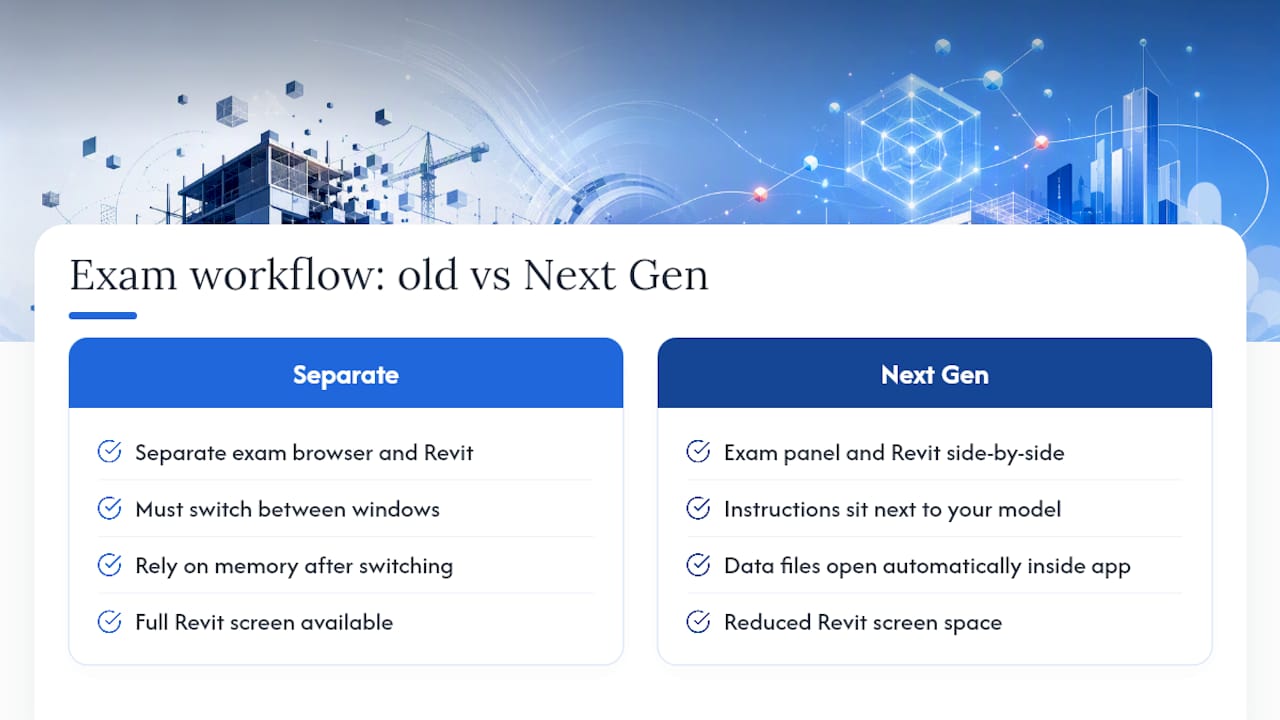
Screen resolution and display settings can affect how the ribbon collapses or how panels lay out, and Certiport notes that candidates using the Next Generation format can restore the application window to work across a second monitor if one is available.
Pro Tip: Before your exam date, install the exact Revit version you’re booked for and set your units to match. Practicing in Revit 2026 metric when your exam is Revit 2024 imperial will cost you time you don’t have.
A 6-Week Study Plan: Learn, Practice, Certify
Certiport’s own model for Autodesk certifications is Learn, Practice, and Certify, and it works precisely because it front-loads doing over watching. Here’s how to spread that across six weeks if you’re starting from a solid beginner base.
Week 1: Interface and navigation. Spend four to five hours getting fast at moving through the project browser, switching views, and setting up levels and grids without hunting for tools by leveraging resources like the Designer Trade Program - Interior Designers | One Day Doors & Closets to understand industry standards.
Week 2: Walls, doors, and windows. Build a small single-story shell. Place and edit openings until you can do it without checking a tutorial.
Week 3: Vertical circulation. Add stairs and railings to your model. This domain has more fiddly settings than any other, so give it real time.
Week 4: Roofs, floors, and components. Close out the building envelope and populate it with furniture or fixture families.
Week 5: Views, annotations, and schedules. Set up sheets, add dimensions and tags, and build at least one schedule from your model data.
Week 6: Timed practice tests. Run through full mock exams under a strict clock, then review every miss against the official objective list, not your gut feeling about what you knew.
Building one compact project that touches every domain, rather than a dozen disconnected exercises, exposes weak spots faster than command memorization ever will. If you want a ready-made version of this, S15studio’s practice projects are scoped in one to eight hour blocks that mirror this exact structure.
Pro Tip: Keep a running checklist of the exam objectives and check items off as you complete them in your practice model, not as you watch someone else complete them.
How Do You Register for the Revit ACU Exam?
Booking runs through Certiport, and Autodesk’s certification pages route you there directly. You’ll create a Certiport account, locate the ACU Revit exam under Autodesk’s certification catalog, and pick a delivery method.
Authorized testing center: available in most regions, with proctored, controlled conditions.
Online proctoring: offered in some countries, letting you test from home with remote monitoring; availability varies, so check for your location before assuming it’s an option.
Version and unit selection: confirm whether you’re booking Revit 2024, 2025, or 2026, and whether it’s metric or imperial, before you commit to a slot.
Format confirmation: verify you understand whether your session runs Next Generation or an older classic format.
Fees, exact scheduling windows, and reschedule policies vary by test center and country, so treat Certiport’s booking page as the final word rather than any third-party estimate. Don’t lock in a date until you’ve matched your practice environment to what you’ll actually see on exam day.
Common ACU Exam Mistakes and Exam-Day Tips
The mistakes that sink candidates are rarely about Revit knowledge. They’re about mismatched setup.
Practicing in a different Revit version than the one booked for the exam.
Training in the wrong unit system, then losing time reorienting mid-task.
Skipping timed mock exams and only reviewing tutorials passively.
Never test-driving the Next Generation interface before exam day.
On the day itself, check your display setup and internet connection early, have photo ID ready, and pick a quiet, uninterrupted room if testing online. Read every performance task fully before touching the mouse, estimate time per task, and if one is dragging, flag it and move on rather than burning your clock on a single stair detail.
Pro Tip: Do one full practice run at the same time of day as your actual appointment. Fatigue and focus shift more than people expect between a 9 a.m. and a 4 p.m. session.
How Is the Revit ACU Exam Scored?
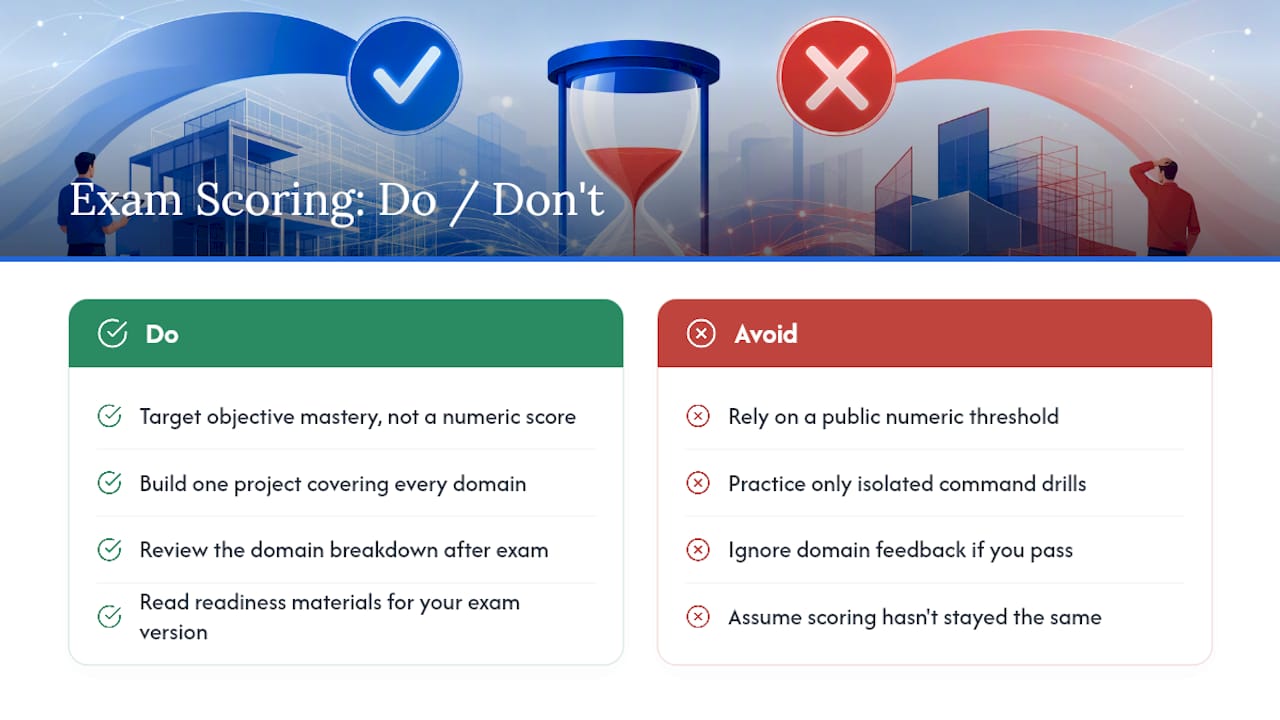
Certiport scores the exam on a pass/fail basis rather than a public numeric scale candidates can study toward, so your prep target should be objective mastery, not a score threshold. Performance-based tasks are graded on whether the resulting file or answer matches the expected outcome, meaning partial credit is limited if a step is skipped or a value entered incorrectly.
Multiple choice, matching, and point-and-click items are scored more conventionally, each contributing to your overall result. Because the exam blends both formats, a candidate who’s fast with the interface but shaky on documentation vocabulary can still underperform. That’s part of why building one project that forces you through every domain, from levels to schedules, beats isolated command drills.
You typically see a pass or fail result immediately after finishing, sometimes with a breakdown by domain area showing where you were weaker. That domain breakdown is worth taking seriously even if you pass. It tells you where a follow-up certification, or simply more practice, will pay off before you move into more advanced Revit work.
Because scoring mechanics can shift slightly between exam versions and Certiport updates, the safest move is to read the specific readiness materials tied to your booked version rather than relying on general assumptions carried over from an older ACU release.
What Happens If You Fail? Retake Policy and Validity
If you don’t pass, Certiport allows retakes, though most testing centers apply a waiting period between attempts rather than letting you rebook the same day. Policies on exact wait times and any retake fees vary by test center and country, so confirm the specifics with your center or through your Certiport account before assuming a timeline.
The ACU credential itself doesn’t carry a strict expiration date the way some professional-level certifications do, but Revit changes enough version to version that the practical value of an older certification fades over time. A credential earned on Revit 2020 tells an employer less about your current skills than one earned on Revit 2025 or 2026, even though the certificate itself never technically “expires.”
If you fail, resist the urge to just rebook and try again cold. Go back through the domain breakdown from your results, identify which specific skill areas dragged you down, and run targeted practice on exactly those before your next attempt. Candidates who retake blind, without adjusting their prep, tend to repeat the same mistakes.
How Are Questions Distributed Across Exam Topics?
Certiport doesn’t publish a granular percentage breakdown per domain, and any guide claiming exact weightings for each topic is likely estimating rather than quoting an official figure. What the ACU Revit datasheet does confirm is the list of domains tested, and in practice, documentation and modeling tasks tend to make up the bulk of performance-based items since those are the skills most directly tied to daily Revit use.
That means walls, doors, windows, and component placement typically get more coverage than narrower topics like stairs or railings, simply because they come up more often in a typical project. Views, annotations, and schedules also carry real weight, since documentation is half of what makes someone “Revit certified” rather than just “someone who can draw a wall.”
Rather than trying to guess a percentage split and studying to that guess, the more reliable approach is to treat every domain on the official list as equally testable. Build your practice project to include all of them, in proportion to how often you’d use them on a real job. That naturally mirrors the exam’s actual emphasis without needing a published weighting table that doesn’t exist.
Does the ACU Certification Help Your Career?
The ACU sits at the entry point of Autodesk’s certification ladder, below the Autodesk Certified Professional tracks, and it functions as proof that you can operate Revit at a working level rather than just having clicked through a course. For students and early-career candidates, that’s often the exact gap employers want closed. A resume line that says “proficient in Revit” is a claim. A Certiport-verified ACU credential is evidence.
It won’t replace a portfolio or real project experience, and firms hiring for mid-level BIM roles will care more about your worksharing and coordination skills than your ACU status. But for internships, junior drafting roles, or transitioning from a related CAD background into Revit-based work, it’s a credible signal that costs relatively little time to earn.
The Autodesk certification overview frames ACU as the foundation tier, with Associate and Professional-level exams sitting above it for candidates who want to keep building credentials as their skills grow. Treat it as a stepping stone, not a destination, and it does exactly what it’s designed to do.
What Does the ACU Exam Cost and How Do You Pay?
Certiport sets exam pricing and payment options at the test center or account level, and fees vary by country and by whether you’re booking through a school, employer, or individual account. Rather than quoting a figure that may not match your region, check the exact price through your Certiport account or test center at the point of booking, since that’s the only number that reflects your actual location and delivery method.
Payment is typically handled through Certiport’s own checkout, which generally accepts standard credit and debit cards, and in some cases vouchers purchased in bulk by schools or training providers for their students. If you’re going through an educational institution, ask whether they already hold vouchers before you pay out of pocket, since bundled academic pricing is common.
Budget separately for retake fees if needed, since a second attempt after a failed exam is rarely free, and confirm your test center’s specific retake cost alongside its waiting period.
Why Timed, Project-Based Practice Beats Passive Studying
Command memorization fails on exam day because the ACU doesn’t ask you to recite a tool, it asks you to produce a result under a clock. Trainers see this constantly: a candidate who can explain how to build a stair perfectly still panics when the Next Generation panel puts a live timer next to a real project file.
Short timed builds, one to eight hours each, covering a single domain like stairs or schedules, do something video tutorials can’t. They force execution speed, not just recognition. Students who run several of these before their exam consistently report the actual test feeling slower than their practice runs, which is the opposite of what most candidates expect walking in. Direct feedback on those practice builds, from someone who’s watched hundreds of learners hit the same wall, tends to shave weeks off the guesswork.
— Steve
How S15studio Helps You Prepare for the Revit ACU Exam
S15studio replaces scattered YouTube tutorials with a structured path that maps directly onto ACU exam domains, including full trainer support and lifetime access to every material you buy.
The Revit Course Only package, priced at €79 one-off, takes you from beginner through advanced Revit workflows using the same project-based structure covered in this guide: levels, walls, stairs, roofs, views, and schedules, built as one continuous model rather than disconnected drills. If you’re just starting out and want a lighter entry point before committing further, the Revit Introduction course runs €20 one-off and covers the interface fundamentals that trip up first-time ACU candidates. Every course includes direct feedback from a qualified trainer, so when a stair detail or schedule setup doesn’t click, you’re not stuck guessing alone.
Start with the Revit Course Only page to see the full curriculum and enroll before your exam date locks in.
Sources
FAQ
What Is the Revit ACU Exam?
The Revit ACU exam is Autodesk’s entry-level, performance-based certification confirming you can navigate the interface and complete real modeling and documentation tasks in Revit. It’s administered through Certiport and tied to a specific Revit version and unit system chosen at booking.
How Long Is the ACU Revit Exam?
Historical guidance points to roughly 30 questions within a 75-minute limit, though the exact specification can vary by version and country. Always confirm the exact timing on your Certiport booking confirmation before your appointment.
What Revit Version Should I Practice On?
Practice on the exact Revit version and unit system, metric or imperial, that you booked through Certiport for your appointment. Mismatched versions or units are one of the most common, and easily avoidable, causes of lost time on exam day.
How Much Does the ACU Exam Cost?
Pricing is set by Certiport and your test center, and it varies by country and delivery method, so check your exact fee through your Certiport account at booking. Schools and training providers sometimes hold bulk vouchers, so ask before paying individually.
Can S15studio Help Me Prepare for the ACU Exam?
Yes. S15studio’s Revit Course Only package, €79 one-off, and the Revit Introduction course, €20 one-off, both use project-based exercises that mirror the domains tested on the ACU exam, backed by direct trainer support.
Recommended
Comments